
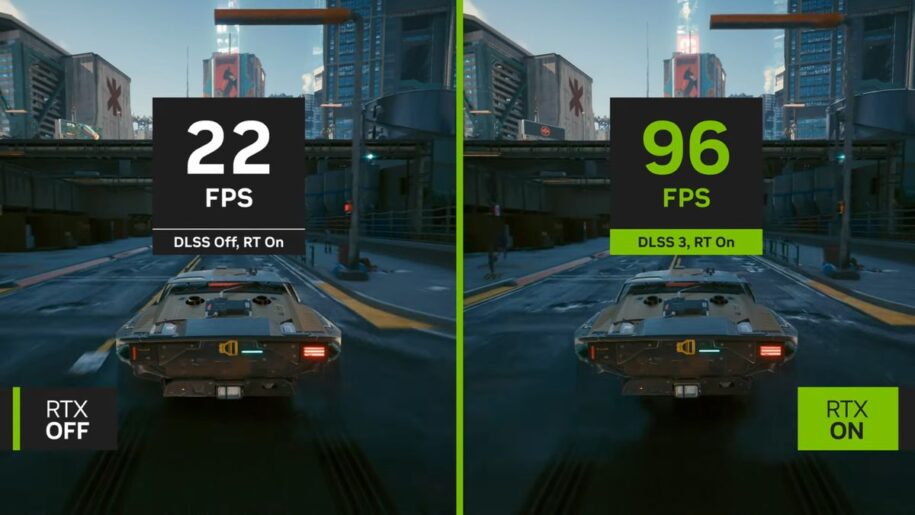
One of the most exciting performance leaps in gaming performance recently hasn’t been raw power via hardware. No, it’s something under the hood. This leap is frame generation and it is a literal game changer.
The concept itself can sound sort of silly. How can you just generate more frames? Surely that would necessitate a more powerful graphics card, right? That turned out to not be the case with the introduction of DLSS 3. This version of NVIDIA’s performance boosting tech introduced he world to generating new frames to result in faster framerates on existing hardware. Let’s learn more about what frame generation is and how it works.
Table of Contents
What is Frame Generation?
Frame generation uses the power of artificial intelligence to create additional frames that are inserted between those rendered the traditional way by your GPU. This “predicted” frame makes games run smoother and results in drastically higher framerates without any additional tax on your graphics card. It almost sounds too good to be true, free performance coming out of nowhere. But it does work.
Frame generation can be used in conjunction with the performance boost you already get from upscaling tools like NIVIDIA DLSS or AMD FSR. The result is blazingly fast framerates on hardware that wouldn’t ordinarily be able to do that the “traditional way”.
The result can be drastic. Imagine going from running a game well under 60 fps with choppy, inconsistent frames, to playing the same game with BETTER graphics and FASTER framerates. Frame generation makes this a reality. Hell, you could even turn on extra graphical bells and whistles, like ray-traced shadows or reflections.
So How Does Frame Generation Work?
It can seem like gaming black magic, but the concept on which frame generation works is pretty simple to understand. With traditional game rendering, your graphics card renders a single frame and sends that out. This is obviously happening many times a second (hence the term “frames per second”). Better, faster, more powerful graphics cards can do this more times a second and with more demanding graphics effects. But no matter the GPU, this is what is going on under the hood.
With frame generation. Your GPU no longer has to render every single frame. Using data and algorithms, artificial intelligence is able to predict what the next frame should look like and then insert that AI generated frame in to the sequence. So let’s say in the time it normally took your GPU to render 2 frames, it can now generate 3. Scale that up via multiplication, and you can see how when you are getting say 60FPS the traditional way, with frame generation you might be seeing 100+ FPS in the same game with the same graphics settings.
Currently, NVIDIA has the most effective form of frame generation. This is thanks to optical flow accelerators that are built in to RTX 40 Series and above graphics cards. These dedicated processors are able to keep track of a variety of graphical details and effects, which it can then feed into the AI model behind frame generation to generate those delicious extra frames.
Not every game supports frame generation, but the ones that do and do it well can be transformative. It feels like magic to turn on frame generation and suddenly see frame rates you thought unreachable in that game on your current hardware.
In terms of frame generation, both NVIDIA and AMD have their own types of frame generation. NVIDIA pulls ahead in terms of how well it works, especially with their upcoming DLSS 4.5. AMD’s frame generation technology offered through their FSR suite, and their most recent version (Redstone) is powered by AI, and closes the performance gap between themselves and NVIDIA.
NVIDIA’s DLSS 4.5 will offer a 6x frame generation mode, which shoots out 5 generated frames per traditionally rendered frame. While AMD’s Redstone sticks to a 2x multiplier, which is 1 generated frame per traditionally rendered frame.
How do I enable Frame Generation?
For gamer’s with NVIDIA RTX 40 Series graphics cards or newer & AMD Radeon 9000 Series graphics cards (for Redstone, AMD’s frame generation solution), let’s take a look at how to enable frame generation so you can experience the magic for yourself.
In supported titles, frame generation will be available as a tick-box in the display options of the game’s settings. Frame generation can be used in conjunction with other performance boosters, like NVIDIA DLSS, NVIDIA Reflex, or AMD FSR.
For users with RTX 50 Series GPUs, multi frame generation is available in the same menu, on supported games. You can select your frame multiplier, whether that be 2X, 3X, or 4X modes.
Hardware-accelerated GPU scheduling must be enabled in Windows settings to be able to use DLSS frame generation. For our Windows 11 users, this is enabled by default so you don’t need to worry about this.
If you are still rocking Windows 10, it’s simple to enable. Press your Windows key, type “graphic settings”, and hit enter. This will open your graphics settings menu in a window. Select “Hardware-accelerated GPU scheduling” and ensure it is now enabled. Restart your PC to activate this feature and you are good to go with enabling frame generation in your supported games.
In the market for a new PC that can take advantage of Frame Generation tech? Check out our current gaming PC deals for the latest discounts.