First introduced back in January at CES 2026, NVIDIA DLSS 4.5 Super resolution brings with it some new performance boosting features, further boosting image quality across all GeForce RTX GPUs with a 2nd generation transformer AI model. For those of you with an RTX 50 Series GPU, DLSS 4.5 introduces Dynamic Multi Frame Generation, which allows for up to a 6X multi Frame Generation.
Let’s take a look at how you can enhance your games and apps with the power of the new features of DLSS 4.5. While previous generation RTX Graphics cards can take advantage of some of DLSS 4.5’s features, this article will primarily focus on those available for the latest RTX 50 Series graphics cards. Check out the chart below to see what features are available on each generation of RTX GPUs.
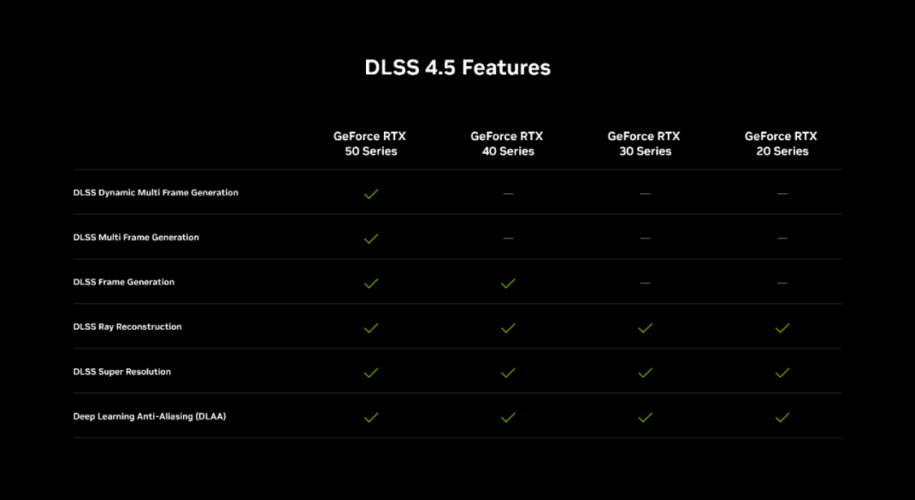
Table of Contents
Key Features of DLSS 4.5
2nd Gen Transformer Model
DLSS 4.5 replaces its earlier upscaling model with a second generation transformer architecture. This is the same sort of AI model that is used for things like ChatGPT, but for images and motion. This new model is trained on a larger, more high quality dataset and uses 5x more computer than the first transformer model.
Instead of just taking a single frame, this model understands entire scenes over time (spatial and temporal awareness). It takes in a bunch of inputs from a game, like raw low resolution frames, how an object moves within the game (motion vectors), and lighting and depth data from the game engine.
A good way of simply putting how this new model works is that instead of upscaling pixels it is taking frames and reconstructing what the image should look like. Previous versions of DLSS worked great, but had certain limitations. Fine detail could become blurred, fast motion could exacerbate this more, and visual artifacts like ghosting and shimmering could show up. DLSS 4.5 addresses these shortcomings.
The result is a sharper image than before, sometimes even rivaling a native resolution, more stable and faster framerates, and less visual artifacts like ghosting and shimmering.
Dynamic Multi Frame Generation
Who wouldn’t want more frames? Dynamic Frame generation is the star of DLSS 4.5, introducing a new, intelligent system that functions as NVIDIA puts it, “like an automatic transmission” for your GPU. Instead of trying to hit a fixed frame multiplier, it can dynamically shift between different multiplies to strike that sweet spot of fast frame rate, crisp image quality, and responsive gameplay.
It will only generate the frames needed to maximize your selected target frame rate or the refresh rate of your monitor. The system is always looking at the gap between your displays refresh rate and your GPUs performance, and adapting on the fly. Hit a graphically intense section in your game? It kicks in to increase frame generation and bridge what would have been performance dips, keeping your gameplay buttery smooth. Conversely, in less intensive scenes, it can shift the multiplier down to only do what is needed.
You can activate DMFG globally or on a per game basis, using the NVIDIA App.
Maximum Frames and Smoothness with new 6X Mode
The first iteration of DLSS Frame Gen introduced a 2X frame multiplier, meaning 1 additional frame would get rendered per traditionally rendered frame. Doubling your framerate is nothing to scoff at, but we gamers always love pushing performance to the max. DLSS 4 Multi Frame Generation introduced a 4X multiplier for 50 Series GPUs, and now with 4.5, the latest maximum multiplier has been raised to 6X. That’s 5 additional frames for each natively rendered frame, on RTX 50 Series GPUs.
With the introduction of the dynamic frame gen mode, youc an now choose between dynamic and fixed multi frame generation in the NVIDIA App.
Fixed mode is the same as previous multi frame gen options, and will run supported games at the frame gen multiplier you select.
To select your option in the app, open “DLSS Override – Frame Generation” and either globally or on a game by game basis select your frame Gen multiplier.
Improved Image Quality for all RTX Graphics Cards
DLSS 4.5 Super Resolutions new 2nd gen transformer AI model utilizes 5X the computer power of the original transformer model, and has been trained on a higher fidelity data set to more intelligently use game engine pixel sampling and motion data to deliver images the have better lighting, crisp edges, and better motion clarity.
Previous generation DLSS models could result in muted lighting, lost details, and crushed shadows, especially in high contrast scenes. With DLSS 4.5, it can now process lighting with much better physical accuracy, so things like glowing neon signs or flickering candle lights and games retain their full color range and detail.
DLSS 4.5 improves image quality across all mode settings, from quality to balanced mode, but you will see the largest improvements in performance and ultra performance modes.
Now performance mode is often comparable to, and in some cases can even beat, native image quality. Additionally, ultra performance mode is an excellent choice for 4K gaming. Overall, you can expect a huge leap in image quality across the board when using DLSS 4.5. Just take a look at this example from The Elder Scrolls IV: Oblivion Remastered , where gameplay is much clearer than when using DLSS 4. Or this example from Kingdom Come Deliverance II where a candles flickering light looks much better.
DLSS 4.5 on CyberPowerPC
Experience the game changing capabilities that DLSS 4.5 brings to your gaming and creating. Browse our selection of desktops powered by NVIDIA Blackwell GeForce RTX 50 Series GPUs and experience DLSS for yourself!
Which Games have DLSS support?
To view the full listed of DLSS-supported games, including those that feature DLSS 4.5, head to this helpful list from NVIDIA.